Why is he faster than me?
PitStatus also records the laps of the drivers on track with you. Put your lap next to the faster one and the Engineer shows where the gap opens, phase by phase.
EngineerYour pit wall, on your screen
PitStatus records your laps and compares them corner by corner. It doesn't hand you numbers. It tells you what to do: brake later, get on the throttle sooner, carry more speed.
Free. Windows 10 and 11. Works with F1 25 (2026 Season Pack) on PC, PS5 and Xbox Series X|S.
This is the Engineer panel from the app, running on two of our founder's laps at Zandvoort. Click a corner on the map or a card in the report.
 Engineer
Zandvoort · Qualifying
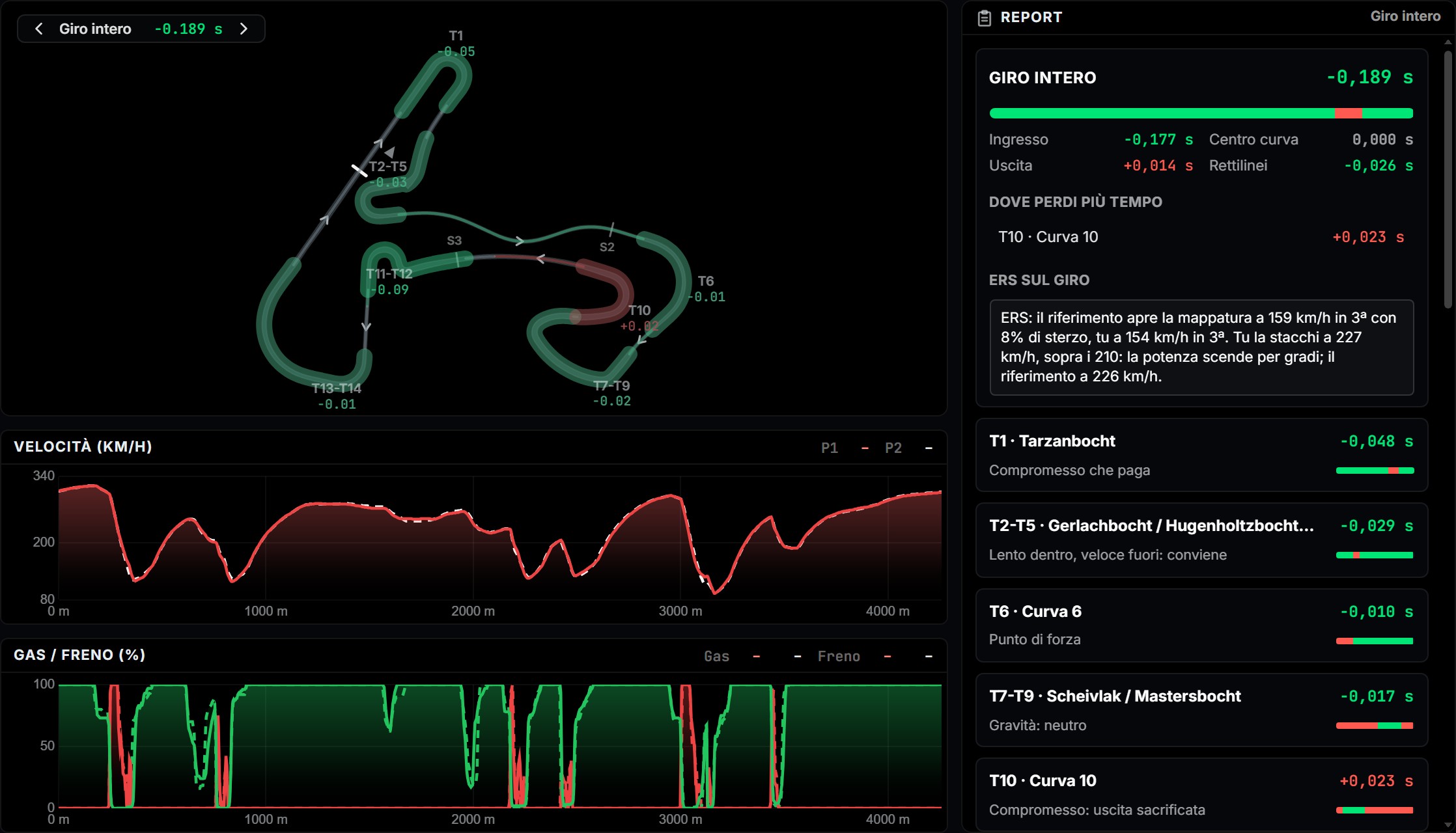
PitStatus also records the laps of the drivers on track with you. Put your lap next to the faster one and the Engineer shows where the gap opens, phase by phase.
EngineerSee how much energy you deploy and harvest in every zone, against the lap's recharge limit. You decide which straight to give up before the race, not during it.
ERSStint Analysis lines up tyres, wear and pace lap after lap, so you can see when the stint falls away.
Stint AnalysisSee your battery level, energy deployed and energy harvested zone by zone across the same two laps. Find out where you run out of boost and adjust your lift points before the race.
ERS
Zandvoort · Qualifying
These are two qualifying laps: the battery starts full and is empty at the line, so the net balance is negative. In a race you look for the balanced lap, with the balance above zero.
During the session PitStatus also records the laps of the other drivers on track. When someone is quicker, you can put your lap next to theirs and see where the difference is.
Online you see the full telemetry of the drivers who made it public in the game settings. Against the AI and offline, the data always comes through.
Other drivers' data is there for you to compare against. It is never published and never shared on Social.
Free, every feature, no ads in the app. Coming later: we will announce ads in the app before they arrive; the no-ads plan (planned price 1.99 EUR a month or 14.99 EUR a year) will remove them.
€0
Every feature, no ads in the app.
€1.99 / month
Planned price. Or €14.99 a year.
Arrives together with ads in the app, announced in advance.
I'm Giovanni, Gio05596 on track. I've always set up my own cars and helped my teammates by watching their onboards and telling them what I saw. In 2026 the rules changed and energy management became decisive. PitStatus began there.
Yes. Every feature is free, and there are no ads in the app today. Ads are coming later and we will announce them in advance. The no-ads plan is planned at €1.99 a month or €14.99 a year, and it is not available to buy yet.
Yes. The game sends its telemetry over your home network to PitStatus running on a Windows PC.
EA SPORTS F1 25 with the 2026 Season Pack, on PC, PS5 and Xbox Series X|S.
Yes. You create it inside the app the first time you open it.
Online you see the full telemetry of the drivers who made it public in the game settings. Against the AI and offline, the data always comes through.
In your Caveau cloud: they go there on their own and you find them on any computer with your account.
Install PitStatus, drive a session and open the Engineer.
Download for Windows